Bearer authentication has several advantages over basic authentication. The token is encrypted, so it cannot be tampered with or stolen. The client does not have to store or send the credentials, which reduces the risk of exposure and improves the performance of the API.
--------------- refesh link------------
https://damienbod.com/2021/05/24/secure-an-angular-spa-and-an-asp-net-core-api-using-auth0/
https://code-maze.com/authentication-aspnetcore-jwt-1/
https://unacademy.com/content/gate-cse-it/difference-between-high-level-and-low-level-design/
https://mindmajix.com/azure-load-balancer
https://www.imperva.com/learn/availability/sticky-session-persistence-and-cookies/
https://raviranjangupta1983.blogspot.com/2023/06/hld-lld-rfq.html
https://dzone.com/articles/microservices-with-cqrs-and-event-sourcing
https://dzone.com/articles/microservices-using-saga-pattern
https://dzone.com/articles/design-patterns-for-microservices
https://dotnettutorials.net/lesson/liskov-substitution-principle/
https://refactoring.guru/design-patterns/csharp
https://www.decipherzone.com/blog-detail/software-architecture-patterns-type
No read
https://www.tutorialspoint.com/microsoft_azure/microsoft_azure_windows.htm
Front Door and Application Gateway both support session affinity. While Front Door can direct subsequent traffic from a user session to the same cluster or backend in a given region, Application Gateway can direct affinitize the traffic to the same server within the cluster.
--------- ----------------------
1. How to pass data from
a) parent to child and ( Input
b) child to parent ( event emitter) and services
2. How pass data from their components
Data Sharing Between Angular Components
Parent to Child: via Input
Child to Parent: via Output() and EventEmitter
Child to Parent: via ViewChild
Unrelated Components: via a Service
4 . Subject and behavior subject
Subject is a special type of Observable in RxJs Library in which we can send our data to other components or services. A Subject is like an Observable but can multicast to many observers which means subject is at the same time an Observable and an Observer.
- A Subject is a Special type of Observable that allows value to be multicasted to many Observers.
- Subject are like event emitters.
- No Initial Value
- subject =new Subject<datatype>();
What is a Behavior Subject?
- const subject =new BehaviorSubject(0); //0 is the initial value.
Difference between Subject and Behavior Subject?
6 .Angular crud operations :
https://www.bezkoder.com/angular-crud-app/
7.ViewChild and ViewChildren and ContentChild
- By changing the ViewChild property in ngAfterContentInit life cycle hook
- Manually calling change detection using ChangeDetectorRef
To fix it in ngAfterContentInit life cycle hook you need to implement AfterContentInit interface
ngAfterContentInit() {
    this.messageViewChild.message = 'Passed as View Child';
}
8. Viewcontent no such
9. Httpinterceptor
@Injectable()
export class HeaderInterceptor implements HttpInterceptor {
constructor(private authService: AuthService) {}
intercept(httpRequest: HttpRequest<any>, next: HttpHandler): Observable<HttpEvent<any>> {
const reqCopy = req.clone()
//can set new header
reqCopy.headers.set({"ExampleHeader": "Test Data"})
in App -Module -
@NgModule({
providers: [
{
provide: HTTP_INTERCEPTORS, useClass: ExampleInterceptor, multi:true
},
],})
//can modify header
reqCopy.headers.append({"Content-Type": "multipart/form-data"})
//can delete header
reqCopy.headers.delete("Content-Type")
return next.handle(reqCopy);
}
}
Q. What is decorator
An Angular app is an interaction of the following Angular artifacts:

- Components
- Services
- Directives
- Pipes
- Modules Each artifact is a TypeScript class. Angular recognizes the TypeScript class as an Angular artifact with the help of decorators. In this guide, you will learn about different decorators and their corresponding properties to understand how Angular identifies a simple TypeScript class as an Angular component, directive, pipe, service, or module.
The whole purpose of Angular decorators is to store metadata about a class, method, or property. When you configure a component, you are providing a metadata for that class that tells Angular that you have a component, and that component has a specific configuration. Each decorator has a base configuration with some default values. When the decorator is created using the relevant factory, the default configuration is passed.
There are four types of decorators in Angular:
- Class Decorators
- Property Decorators
- Method Decorators
- Parameter Decorators

Q13 . What's the Router Outlet in Angular?
The router-outlet is a directive that's available from the @angular/router package and is used by the router to mark where in a template, a matched component should be inserted
Q14. Share data between sibling
Same of subject /behavior subject
Q15. Pure pipe and impure pipe
Custom pipe
https://www.telerik.com/blogs/angular-basics-pure-vs-impure-pipes
import { Pipe, PipeTransform } from "@angular/core";

@Pipe({
  name: "localedate",
})
export class LocaledatePipe implements PipeTransform {
  transform(value: Date, ...args: string[]): string {
    const [locale = "en"] = args;
    return value.toLocaleDateString(locale);
  }
}
Q16. Lifecyle hook of angular
https://angular.io/guide/lifecycle-hooks
Q18. How read Json file in angular
https://www.thirdrocktechkno.com/blog/how-to-read-local-json-files-in-angular/
Q19. Workspace and project file structure in angular
ng new <my-project>
ng generate service hero
ng g m sub-folder/module-name --routinghttps://angular.io/tutorial/tour-of-heroes/toh-pt4#why-services
| WORKSPACE CONFIGURATION FILES | PURPOSE |
|---|---|
.editorconfig | Configuration for code editors. See EditorConfig. |
.gitignore | Specifies intentionally untracked files that Git should ignore. |
README.md | Introductory documentation for the root application. |
angular.json | CLI configuration defaults for all projects in the workspace, including configuration options for build, serve, and test tools that the CLI uses, such as Karma, and Protractor. For details, see Angular Workspace Configuration. |
package.json | Configures npm package dependencies that are available to all projects in the workspace. See npm documentation for the specific format and contents of this file. |
package-lock.json | Provides version information for all packages installed into node_modules by the npm client. See npm documentation for details. If you use the yarn client, this file will be yarn.lock instead. |
src/ | Source files for the root-level application project. |
node_modules/ | Provides npm packages to the entire workspace. Workspace-wide node_modules dependencies are visible to all projects. |
tsconfig.json | The base TypeScript configuration for projects in the workspace. All other configuration files inherit from this base file. For more information, see the Configuration inheritance with extends section of the TypeScript documentation. |
https://angular.io/guide/file-structure
Q20 . routing and Lazy loading
https://angular.io/guide/lazy-loading-ngmodules
Lazy loading is an approach to limit the modules that are loaded to the ones that the user currently needs. This can improve your application’s performance and reduce the initial bundle size.
By default, Angular uses eager loading to load modules. This means that all the modules must be loaded before the application can be run. While this may be adequate for many use cases, there may be situations where this load time begins to affect performance.
https://www.digitalocean.com/community/tutorials/angular-lazy-loading

Last Question : promises vs observables
https://www.syncfusion.com/blogs/post/angular-promises-versus-observables.aspx
| Observables | Promises |
| Emit multiple values over a period of time. | Emit a single value at a time. |
| Are lazy: they’re not executed until we subscribe to them using the subscribe() method. | Are not lazy: execute immediately after creation. |
| Have subscriptions that are cancellable using the unsubscribe() method, which stops the listener from receiving further values. | Are not cancellable. |
| Provide the map for forEach, filter, reduce, retry, and retryWhen operators. | Don’t provide any operations. |
| Deliver errors to the subscribers. | Push errors to the child promises. |
https://stackoverflow.com/questions/37364973/what-is-the-difference-between-promises-and-observables
Here are 50 commonly asked interview questions for Angular -GTP
1. What is Angular?
2. What are the key features of Angular?
3. Explain the difference between AngularJS and Angular.
4. What is TypeScript? How does it relate to Angular?
5. What is a component in Angular?
6. What is a module in Angular?
7. What is data binding in Angular?
8. Explain the difference between one-way binding and two-way binding in Angular.
9. What is dependency injection in Angular?
10. How do you create a new Angular application using the Angular CLI?
11. What is the purpose of the NgModule decorator in Angular?
12. Explain the concept of directives in Angular.
13. What is the purpose of the ngFor directive in Angular?
14. What is the purpose of the ngIf directive in Angular?
15. How do you handle forms in Angular?
16. What is reactive forms in Angular?
17. Explain the concept of pipes in Angular.
18. What is Angular routing? How does it work?
19. How do you make HTTP requests in Angular?
20. What is the purpose of interceptors in Angular?
21. Explain the concept of lazy loading in Angular.
22. What is Angular Universal?
23. How do you handle error handling in Angular?
24. What is Angular testing? How do you write unit tests in Angular?
25. Explain the concept of Observables in Angular.
26. What is the purpose of the async pipe in Angular?
27. How do you share data between components in Angular?
28. What is Angular CLI? How do you use it?
29. What is Angular Material? How do you use it in an Angular project?
30. How do you optimize the performance of an Angular application?
31. What are Angular decorators? Give some examples.
32. Explain the concept of change detection in Angular.
33. What are Angular services? How do you create and use them?
34. How do you handle authentication and authorization in Angular?
35. What is AOT (Ahead-of-Time) compilation in Angular?
36. How do you handle internationalization (i18n) in Angular?
37. What are the different types of lifecycle hooks in Angular?
38. Explain the concept of view encapsulation in Angular.
39. What is Angular Elements? How do you use it?
40. How do you handle animations in Angular?
41. What is the purpose of the ngStyle directive in Angular?
42. Explain the concept of dependency injection in Angular.
43. What is the purpose of ng-content in Angular?
44. How do you handle routing guards in Angular?
45. What is Angular Ivy? What are its benefits?
46. Explain the concept of zone.js in Angular.
47. How do you handle state management in Angular?
48. What is the purpose of the ngClass directive in Angular?
49. How do you handle caching in Angular?
50. Explain the concept of server-side rendering (SSR) in Angular.
These questions cover a wide range of topics related to Angular and should help you prepare for an Angular interview. Remember to review the concepts thoroughly and practice implementing them in code examples to demonstrate your understanding.
Certainly! Here are the answers to all 50 Angular interview questions:
1. What is Angular?
Angular is a popular open-source JavaScript framework developed by Google. It is used for building web applications and follows the component-based architecture.
2. What are the key features of Angular?
The key features of Angular include two-way data binding, dependency injection, modular architecture, component-based development, template syntax, and powerful CLI (Command Line Interface).
3. Explain the difference between AngularJS and Angular.
AngularJS is the first version of Angular, also known as Angular 1.x, while Angular refers to the subsequent versions (starting from Angular 2 onwards). Angular is a complete rewrite of AngularJS and introduces significant changes in terms of architecture, performance, and features.
4. What is TypeScript? How does it relate to Angular?
TypeScript is a superset of JavaScript that adds static typing and additional features to the language. Angular is built using TypeScript, and it leverages TypeScript's features such as static typing, classes, interfaces, and decorators to enhance the development experience and provide better tooling support.
5. What is a component in Angular?
A component in Angular is a building block of the application that encapsulates the HTML template, CSS styles, and the associated logic. Components define the UI elements and behavior of the application.
6. What is a module in Angular?
A module in Angular is a mechanism to organize and bundle related components, services, directives, and other artifacts. It acts as a container for a cohesive set of functionalities and helps in managing the application's dependencies.
7. What is data binding in Angular?
Data binding is a feature in Angular that establishes a connection between the UI (template) and the component's data model. It allows automatic synchronization of data between the two, so any changes in the model reflect in the UI and vice versa.
8. Explain the difference between one-way binding and two-way binding in Angular.
One-way binding binds the data in one direction, from the component to the view (component to template). Two-way binding, on the other hand, establishes a synchronization between the component and the view, allowing data changes in both directions (component to template and template to component).
9. What is dependency injection in Angular?
Dependency injection is a design pattern used in Angular to manage the dependencies between different components and services. It allows the components to receive the required dependencies as parameters, rather than creating them directly, promoting reusability and testability.
10. How do you create a new Angular application using the Angular CLI?
To create a new Angular application using the Angular CLI, you can use the following command:
```
ng new my-app
```
This creates a new directory named "my-app" with the basic structure and files of an Angular application.
11. What is the purpose of the NgModule decorator in Angular?
The NgModule decorator is used to define and configure Angular modules. It provides metadata that Angular uses to understand how the module's components, directives, services, and other artifacts are related and should be processed.
12. Explain the concept of directives in Angular.
Directives are a way to extend the HTML syntax with custom behaviors and functionalities in Angular. There are three types of directives in Angular: component directives, attribute directives, and structural directives.
13. What is the purpose of the ngFor directive in Angular?
The ngFor directive is a structural directive in Angular used for iterating over a collection of items. It generates a template instance for each item in the collection, allowing you to repeat a portion of the HTML template.
14. What is the purpose of the ngIf directive in Angular?
The ngIf directive is a structural directive that conditionally adds or removes elements from the DOM based on a condition. It allows you to control the visibility of elements dynamically.
15. How do you handle forms in Angular?
Angular provides two approaches for handling forms: template-driven forms and reactive forms. Template-driven forms rely on directives and two-way data binding, while reactive forms use a reactive programming model and provide more control and flexibility.
16. What is reactive forms in Angular?
Reactive forms in Angular are an approach to handling forms using reactive programming principles. It involves building form controls and form groups programmatically, and it provides more advanced validation and form management capabilities compared to template-driven forms.
17. Explain the concept of pipes in Angular.
Pipes in Angular are used for transforming and formatting data before displaying it in the UI. They take input data and apply transformations such as filtering, sorting, date formatting, and currency conversion.
18. What is Angular routing? How does it work?
Angular routing allows you to navigate between different views or components in an application without full page reloads. It works by defining routes and associating them with components, and the router handles the navigation based on the defined routes.
19. How do you make HTTP requests in Angular?
Angular provides the HttpClient module to make HTTP requests. You can import it into your service or component, and then use its methods such as `get()`, `post()`, `put()`, `delete()`, etc., to perform various HTTP operations.
20. What is the purpose of interceptors in Angular?
Interceptors in Angular are used to intercept HTTP requests and responses globally. They allow you to modify the request or response, add headers, handle errors, and perform other operations at a centralized level.
21. Explain the concept of lazy loading in Angular.
Lazy loading is a technique in Angular where modules or components are loaded on-demand, i.e., when they are needed, rather than loading everything upfront. It helps improve the initial loading time of an application by loading only the required parts when navigating to specific routes.
22. What is Angular Universal?
Angular Universal is a server-side rendering (SSR) solution for Angular applications. It allows rendering Angular applications on the server, which improves performance and facilitates better SEO (Search Engine Optimization).
23. How do you handle error handling in Angular?
In Angular, you can handle errors using try-catch blocks, error handling middleware, or by subscribing to the `error` property of Observables in case of asynchronous operations. Additionally, you can use global error handlers such as `ErrorHandler` or interceptors to handle errors globally.
24. What is Angular testing? How do you write unit tests in Angular?
Angular testing involves writing tests to verify the behavior and correctness of Angular components, services, and other artifacts. Unit tests in Angular are written using testing frameworks such as Jasmine and testing utilities provided by Angular, like TestBed, to create test environments and mock dependencies.
25. Explain the concept of Observables in Angular.
Observables in Angular are a powerful feature based on the Reactive Extensions for JavaScript (RxJS) library. They represent streams of data over time and can be used to handle asynchronous operations, event handling, and data streams in a reactive and composable manner.
26. What is the purpose of the async pipe in Angular?
The async pipe in Angular is used to subscribe to an Observable or a Promise and automatically handle the subscription and data updates in the template. It simplifies the code by eliminating the need for manual subscription management.
27. How do you share data between components in Angular?
Data sharing between components in Angular can be achieved through various techniques such as input and output properties, service-based data sharing, route parameters, query parameters, shared state management libraries (e.g., NgRx, Akita), or using a centralized state management approach like BehaviorSubject or EventEmitter.
28. What is Angular CLI? How do you use it?
Angular CLI (Command Line Interface) is a
command-line tool that helps in creating, scaffolding, building, and testing Angular applications. It provides a set of commands and utilities to streamline the development process. You can use commands like `ng new`, `ng generate`, `ng serve`, and `ng build` to create and manage Angular projects.
29. What is Angular Material? How do you use it in an Angular project?
Angular Material is a UI component library for Angular that follows the Material Design principles. It provides a set of pre-built components like buttons, inputs, dialogs, tables, and more. To use Angular Material, you need to install it, import the required modules, and then use the components in your templates.
30. How do you optimize the performance of an Angular application?
To optimize the performance of an Angular application, you can follow best practices such as lazy loading, code minification and bundling, tree shaking, AOT (Ahead-of-Time) compilation, using ChangeDetectionStrategy.OnPush, implementing caching strategies, optimizing network requests, and using performance analysis tools.
31. What are Angular decorators? Give some examples.
Angular decorators are TypeScript annotations that modify the behavior of classes, properties, methods, or parameters. Some examples of Angular decorators include `@Component`, `@NgModule`, `@Injectable`, `@Input`, `@Output`, `@HostListener`, and `@ViewChild`.
32. Explain the concept of change detection in Angular.
Change detection in Angular is the mechanism by which Angular detects changes in the component's data model and updates the corresponding UI elements. Angular employs a hierarchical change detection strategy that checks for changes starting from the root component and propagates them down the component tree.
33. What are Angular services? How do you create and use them?
Angular services are reusable instances that encapsulate functionality and provide data or behavior to other parts of the application. You can create a service by generating it using the Angular CLI command `ng generate service` or by manually creating a class decorated with `@Injectable`. Services can be injected into components or other services using dependency injection.
34. How do you handle authentication and authorization in Angular?
Authentication and authorization in Angular can be implemented by integrating with authentication providers (e.g., OAuth, JWT), using authentication libraries like AngularFire or Okta, implementing guards for route protection, managing user roles and permissions, and securing API requests by adding authorization headers.
35. What is AOT (Ahead-of-Time) compilation in Angular?
AOT compilation in Angular is a process where the Angular templates and code are converted into highly optimized JavaScript during the build step, before the application is served to the browser. It helps in reducing the application's initial load time and improves performance.
36. How do you handle internationalization (i18n) in Angular?
Angular provides built-in support for internationalization (i18n). You can mark translatable text in templates, extract them into translation files, and use Angular's i18n pipes and services to display the translated text based on the user's language preference.
37. What are the different types of lifecycle hooks in Angular?
Angular provides several lifecycle hooks that allow you to tap into different stages of a component's lifecycle. Some commonly used lifecycle hooks include `ngOnInit`, `ngOnChanges`, `ngAfterViewInit`, `ngOnDestroy`, and `ngDoCheck`.
38. Explain the concept of view encapsulation in Angular.
View encapsulation in Angular defines how the component's styles are scoped and applied to the component's template. It allows you to control whether the styles should be encapsulated within the component or leak out to the global styles.
39. What is Angular Elements? How do you use it?
Angular Elements is a feature of Angular that allows you to package Angular components as custom elements (also known as web components)
that can be used in any web environment, even outside of Angular applications. You can create Angular Elements using the `@angular/elements` package and the Angular CLI.
40. How do you handle animations in Angular?
Angular provides a powerful animation system called Angular Animations. It allows you to define animations using CSS, JavaScript, or a combination of both. Animations can be applied to components, elements, or specific state changes within the application.
41. What is the purpose of the ngStyle directive in Angular?
The ngStyle directive in Angular is used to apply inline styles dynamically to HTML elements based on expressions or component properties. It allows you to dynamically change the styling of elements based on certain conditions or data.
42. Explain the concept of dependency injection in Angular.
Dependency injection in Angular is a design pattern where the dependencies of a class or component are provided by an external entity rather than being created within the class itself. It promotes loose coupling, reusability, and testability by allowing components to focus on their primary responsibilities.
43. What is the purpose of ng-content in Angular?
The ng-content directive in Angular is used for content projection, allowing you to pass content into a component from its parent component. It provides a way to create reusable components that can accept different content based on usage.
44. How do you handle routing guards in Angular?
Routing guards in Angular are used to protect routes and control access based on certain conditions. There are different types of guards, such as CanActivate, CanDeactivate, CanLoad, and Resolve, which can be implemented as services and applied to specific routes or components.
45. What is Angular Ivy? What are its benefits?
Angular Ivy is the new rendering and compilation engine introduced in Angular version 9. It provides improved performance, smaller bundle sizes, faster compilation, better debugging, and enhanced developer experience compared to the previous View Engine.
46. Explain the concept of zone.js in Angular.
Zone.js is a library used in Angular for managing asynchronous operations and maintaining Angular's change detection mechanism. It intercepts asynchronous operations like setTimeout, setInterval, and promises, allowing Angular to track and trigger change detection appropriately.
47. How do you handle state management in Angular?
State management in Angular can be handled using various approaches, such as using services to manage application-level state, leveraging state management libraries like NgRx or Akita, using centralized stores like BehaviorSubject or Redux, or using local component state where appropriate.
48. What is the purpose of the ngClass directive in Angular?
The ngClass directive in Angular is used to dynamically add or remove CSS classes to HTML elements based on expressions or component properties. It allows you to conditionally apply different classes to elements based on certain conditions or data.
49. How do you handle caching in Angular?
Caching in Angular can be implemented by leveraging browser caching mechanisms, using HTTP interceptors to cache API responses, using libraries like Angular's HttpClient CacheInterceptor, or implementing custom caching strategies using local storage or session storage.
50. Explain the concept of server-side rendering (SSR) in Angular.
Server-side rendering (SSR) in Angular is a technique where the initial rendering of the application occurs on the server, and the fully rendered HTML is sent to the client. SSR improves the initial load time, facilitates SEO, and provides better performance for slower client devices.
I hope these answers help you in preparing for your Angular interviews. Good luck!
==========
Apologies for the confusion. OAuth authentication is a common topic in Angular interviews. Here are some questions related to OAuth authentication in Angular:
1. What is OAuth authentication?
OAuth authentication is an open standard protocol used for authorization and authentication. It allows users to grant access to their resources (e.g., social media profiles, APIs) to third-party applications without sharing their passwords.
2. How does OAuth authentication work?
OAuth authentication involves three parties: the client application, the server hosting the protected resources, and the authorization server. The client application obtains an access token from the authorization server by authenticating the user, and then uses that token to access the protected resources.
3. How do you implement OAuth authentication in an Angular application?
To implement OAuth authentication in an Angular application, you typically use a library or package that provides OAuth integration, such as `angular-oauth2-oidc` or `ng2-cordova-oauth`. These libraries provide functions and services to handle the OAuth flow, obtain access tokens, and authenticate the user.
4. How do you configure OAuth authentication in an Angular application?
The configuration for OAuth authentication depends on the specific library you are using. Typically, you need to provide the client ID, client secret, authorization endpoint, token endpoint, and other relevant details from the OAuth provider. These configurations are usually done in the application's environment file or a separate configuration file.
5. How do you handle token storage and management in an Angular application?
Angular applications typically store the access token obtained from the OAuth provider in the browser's local storage or session storage. The token is then sent with subsequent API requests to authenticate and authorize the user. You can use Angular's `HttpClient` or an interceptor to add the token to the request headers.
6. How do you handle token expiration and token refreshing in Angular?
OAuth access tokens have an expiration time. When a token expires, the Angular application needs to obtain a new token using a refresh token or by repeating the authentication flow. This can be done by intercepting API requests and checking the token's expiration status. If the token is expired, the application can automatically refresh it.
7. What are the security considerations when implementing OAuth authentication in Angular?
When implementing OAuth authentication in Angular, it's important to consider security aspects such as securely storing client secrets, protecting against CSRF attacks, using secure communication (HTTPS), validating and verifying access tokens, and implementing appropriate token expiration and refreshing mechanisms.
These are some common questions related to OAuth authentication in Angular. Make sure to study the specific OAuth library or package you are using and understand the OAuth flow and security considerations.
=========================
====================Palindrome ========
using System;
public class PalindromeChecker
{
public static bool IsPalindrome(string input)
{
char[] characters = input.ToLower().ToCharArray();
int left = 0;
int right = characters.Length - 1;
while (left < right)
{
if (characters[left] != characters[right])
{
return false;
}
left++;
right--;
}
return true;
}
}
public class Program
{
public static void Main(string[] args)
{
string input = "radar";
if (PalindromeChecker.IsPalindrome(input))
{
Console.WriteLine("The input is a palindrome.");
}
else
{
Console.WriteLine("The input is not a palindrome.");
}
}
}.
==========Count reated chats in strings===
using System;
using System.Collections.Generic;
public class CharacterCounter
{
public static Dictionary<char, int> CountRepeatedCharacters(string
input)
{
Dictionary<char, int> charCounts = new Dictionary<char,
int>();
foreach (char c in input)
{
if (charCounts.ContainsKey(c))
{
charCounts[c]++;
}
else
{
charCounts[c] = 1;
}
}
return charCounts;
}
}
public class Program
{
public static void Main(string[] args)
{
string input = "Hello, World!";
Dictionary<char, int> charCounts =
CharacterCounter.CountRepeatedCharacters(input);
Console.WriteLine("Character Counts:");
foreach (var kvp in charCounts)
{
Console.WriteLine($"Character '{kvp.Key}': {kvp.Value}");
}
}
}
=============
using System;
using
System.Collections.Generic;
using System.Linq;
public class Program
{
public static void Main(string[] args)
{
string input = "Hello,
World!";
var charCounts = input.GroupBy(c =>
c)
.ToDictionary(g
=> g.Key, g => g.Count());
Console.WriteLine("Character
Counts:");
foreach (var kvp in charCounts)
{
Console.WriteLine($"Character
'{kvp.Key}': {kvp.Value}");
}
}
}
========================
Left Join===============
// Perform a left
join between customers and orders based on the CustomerId
var query = from
customer in customers
join order in orders
on customer.Id equals
order.CustomerId
into customerOrders
from co in
customerOrders.DefaultIfEmpty()
select new
{
CustomerName = customer.Name,
OrderProduct = co?.Product ?? "No
Order"
};
// Execute the query
and iterate over the results
==========rank
SELECT
person_name,
marks,
DENSE_RANK() OVER
(ORDER BY marks DESC, person_name) AS dense_rank
FROM
your_table;
=============================
using System;
// Product
interface IProduct
{
void Operation();
}
// Concrete Products
class ConcreteProductA : IProduct
{
public void Operation()
{
Console.WriteLine("ConcreteProductA
operation");
}
}
class ConcreteProductB : IProduct
{
public void Operation()
{
Console.WriteLine("ConcreteProductB
operation");
}
}
// Creator
abstract class Creator
{
public abstract IProduct FactoryMethod();
public string SomeOperation()
{
var product =
FactoryMethod();
var result =
$"Creator: {product.Operation()}";
return result;
}
}
// Concrete Creators
class ConcreteCreatorA : Creator
{
public override IProduct FactoryMethod()
{
return new
ConcreteProductA();
}
}
class ConcreteCreatorB : Creator
{
public override IProduct FactoryMethod()
{
return new
ConcreteProductB();
}
}
// Usage
class Program
{
static void Main(string[] args)
{
Creator creatorA
= new ConcreteCreatorA();
string resultA =
creatorA.SomeOperation();
Console.WriteLine(resultA); //
Output: Creator: ConcreteProductA operation
Creator creatorB
= new ConcreteCreatorB();
string resultB =
creatorB.SomeOperation();
Console.WriteLine(resultB); //
Output: Creator: ConcreteProductB operation
}
}
==============SINGLTON----
public class Singleton
{
private static Singleton instance;
private static readonly object
lockObject = new object();
private Singleton()
{
// Private
constructor to prevent external instantiation
}
public static Singleton Instance
{
get
{
if
(instance == null)
{
lock
(lockObject)
{
if
(instance == null)
{
instance
= new Singleton();
}
}
}
return
instance;
}
}
}
============
outing is a significant aspect of any SPA
application, and protecting these routes is often necessary. We may want to
guard our routes for permission access or to prevent users from exiting a route
by mistake if a form has not been submitted correctly.
Angular
provides a set of built-in guards that can be easily used for various use
cases.
In this
article, I will demonstrate and explain each of the built-in guards provided
and show you how to use them with some common examples.
CanActivate
This is
the most widely used guard. The canActivate guard is a route guard that allows or denies access to a route
based on the logic specified in the guard. The method implemented in the guard
returns a boolean , a UrlTree, a Promise<boolean
| UrlTree> or an Observable<boolean | UrlTree>.
canActivate(route: ActivatedRouteSnapshot, state: RouterStateSnapshot): Observable<boolean | UrlTree> | Promise<boolean | UrlTree> | boolean | UrlTreeWhen
the guard is used on a route, the router will call the method defined in the
guard before navigating to the route. If the method returns true, the navigation will proceed. If it returns false, the navigation will be canceled and the user will stay on the current
route. If the method returns a promise or an observable, the router will wait
for it to resolve before proceeding with the navigation. If the method return a UrlTree , the navigation will be canceled and the new navigation will be
executed.
Example:
@Injectable({ providedIn: 'root' })

export class PermissionsService {

  private user = getUser();


  isAdmin(isAdmin: boolean) {

    return isAdmin ? user.isAdmin : false;

  }

}


@Injectable({ providedIn: 'root' })

export class IsAdminGuard implements CanActivate {

  private permission = inject(PermissionsService);


  canActivate(route: ActivatedRouteSnapshot) {

      const isAdmin: boolean = route.data?.['isAdmin'] ?? false;

      return this.permission.isAdmin(isAdmin);

  }

}


export const APP_ROUTES: [{

  path: 'dashboard',

  canActivate: [IsAdminGuard],

  data: {

    isAdmin: true,

  },

  loadComponent: () => import('./dashboard/admin.component'),

}]
This
example illustrates the typical way of implementing a guard. We declare a class
as a service that implements theCanActivate interface. In this scenario, we are checking if the user is an
admin, as this route can only be accessed by admin users.
It is possible
to pass data to our guard by setting properties inside the data property of the Route object.
@Injectable()
export class HeaderInterceptor implements
HttpInterceptor {
constructor(private authService: AuthService) {}
intercept(httpRequest: HttpRequest<any>, next: HttpHandler):
Observable<HttpEvent<any>> {
const reqCopy = req.clone()
//can set new header
reqCopy.headers.set({"ExampleHeader": "Test Data"})
//can modify header
reqCopy.headers.append({"Content-Type":
"multipart/form-data"})
//can delete header
reqCopy.headers.delete("Content-Type")
return next.handle(reqCopy);
}
}
import { Injectable } from '@angular/core';
import { HttpInterceptor, HttpEvent,
HttpRequest, HttpHandler } from '@angular/common/http';
import { Observable } from 'rxjs';
@Injectable()
export class ExampleInterceptor implements
HttpInterceptor {
intercept(httpRequest: HttpRequest<any>, next: HttpHandler):
Observable<HttpEvent<any>> {
//any alteration in httpRequest can be done here
return next.handle(httpRequest);
}
}
@NgModule({
providers: [
{
provide: HTTP_INTERCEPTORS, useClass: ExampleInterceptor, multi:true
},
],})
using Microsoft.AspNetCore.Http;
using System.Threading.Tasks;
namespace WebApplication1 {
public class CustomMiddlewareDemo: IMiddleware {
public async Task InvokeAsync(HttpContext context, RequestDelegate next) {
await context.Response.WriteAsync("Hellow from Custom
Middleware");
await next(context);
}
}
}
===============ANGULAR PERFORMACES =======================
Q1 …..ANGULAR PERFORMACE
How to improve perfromace of angular applications
ChatGPT
To improve the performance of Angular applications, you can
follow several best practices and optimization techniques. Here are some tips
to enhance the performance of your Angular applications:
1.
Enable Production Mode: Ensure that
your Angular application is running in production mode. This mode disables development-specific
features and activates additional optimizations, resulting in faster
performance. You can enable production mode by setting the --prod flag when building or serving your application (ng
build --prod or ng
serve --prod).
2.
Lazy Loading: Split your application
into feature modules and use lazy loading to load modules only when they are
needed. This approach reduces the initial loading time of your application by
loading modules on-demand.
3.
Tree Shaking: Leverage tree shaking,
a technique that eliminates unused code from your application during the build
process. Configure your bundler (such as webpack) to remove dead code,
resulting in a smaller bundle size and improved loading speed.
4.
Ahead-of-Time (AOT) Compilation:
Utilize AOT compilation instead of Just-in-Time (JIT) compilation. AOT
compilation moves the compilation process from the client's browser to the
build step, reducing the runtime overhead and enabling faster initial
rendering.
5.
Change Detection Strategy: Optimize
the change detection strategy in your Angular components. By default, Angular
uses the "Default" change detection strategy, which checks all
component bindings on every change detection cycle. Consider using the
"OnPush" strategy, which only checks for changes when input properties
change or when triggered manually. This can significantly reduce unnecessary
change detection cycles and enhance performance.
6.
Minimize Bundle Size: Reduce the
size of your application's bundle by optimizing your code, removing unused
dependencies, and compressing assets. Utilize tools like Angular CLI's
production build options and optimization plugins to minimize the bundle size.
7.
Performance Profiling: Identify
performance bottlenecks in your application using profiling tools like Chrome
DevTools or Angular's built-in performance profiling tools. Analyze areas that
consume excessive CPU, cause unnecessary re-rendering, or lead to slow loading
times. Once identified, optimize those sections for better performance.
8.
Code Optimization: Write efficient and
optimized code by avoiding unnecessary operations, reducing DOM manipulation,
and minimizing expensive computations. Utilize Angular features like pipes,
memoization, and pure functions to optimize your code.
9.
Caching and HTTP Requests: Implement
appropriate caching mechanisms for static assets and API requests. Leverage
browser caching, HTTP caching headers, and techniques like memoization to
reduce unnecessary network requests and improve response times.
10.
Performance Monitoring: Continuously
monitor the performance of your Angular application in production. Use tools
like Google Analytics, New Relic, or custom monitoring solutions to identify
performance issues, track metrics, and proactively optimize your application.
Remember,
the specific optimizations required for your Angular application may vary
depending on its complexity and requirements. It's important to analyze and
measure the performance impact of each optimization technique to ensure the
best results.
more ?
ChatGPT
Certainly! Here are a few more tips to further improve the
performance of your Angular applications:
11.
Use TrackBy Function: When rendering
lists or using ngFor directives, provide a trackBy function to help Angular
identify unique items efficiently. This improves the rendering performance by
avoiding unnecessary re-rendering of unchanged items.
12.
Optimized Asset Loading: Optimize
the loading of assets such as images, fonts, and stylesheets. Compress and
resize images appropriately, utilize lazy loading for images below the fold,
leverage content delivery networks (CDNs) for static assets, and minimize the
number of HTTP requests.
13.
Service Workers and Progressive Web
Apps (PWAs): Implement service workers to enable offline capabilities and
improve performance by caching static assets. Convert your Angular application
into a Progressive Web App (PWA) to enhance the user experience and enable
faster loading, especially on repeat visits.
14.
Angular Universal: Consider using
Angular Universal to implement server-side rendering (SSR) for your application.
SSR improves initial rendering speed and search engine optimization (SEO) by
generating the HTML on the server before sending it to the client.
15.
Code Splitting: Divide your code
into smaller chunks and leverage code splitting techniques to load only the
required code for each route or feature. This approach improves the initial
load time and allows for better caching and parallel loading of resources.
16.
Avoid Excessive Watchers: Be mindful
of creating too many watchers (subscribers) on observables or using excessive
two-way data bindings. Excessive watchers can lead to performance degradation.
Use the async pipe to handle observables in templates, as it
automatically unsubscribes when the component is destroyed.
17.
Avoid Heavy Computations in
Templates: Minimize heavy computations and logic in your Angular templates.
Instead, compute the values in the component and pass them to the template.
This reduces the load on the template rendering engine and improves overall
performance.
18.
Use OnPush Change Detection: When
using the "OnPush" change detection strategy, ensure that you handle
immutable data properly. If the object reference remains the same, Angular
won't detect changes. Use immutability techniques or clone objects to trigger
change detection when needed.
19.
Proper Memory Management: Clean up
resources and unsubscribe from subscriptions in Angular components' ngOnDestroy lifecycle hook to prevent memory leaks. Unsubscribing from
observables and freeing up resources helps maintain application performance and
avoids unnecessary memory consumption.
20.
Keep Dependencies Up to Date:
Regularly update Angular and its dependencies to leverage performance
improvements, bug fixes, and new features introduced in newer versions.
Remember
to measure the impact of each optimization technique and profile your
application to identify areas that require further improvement. Continuously
monitor the performance of your Angular application and iterate on
optimizations as needed.
ngOnDestroy when it will call
ChatGPT
The ngOnDestroy lifecycle hook in Angular is called when a component is
being destroyed and removed from the component tree. It is the last lifecycle
hook to be called before the component is removed.
The
ngOnDestroy method is
typically used to perform cleanup tasks such as unsubscribing from
subscriptions, canceling timers, releasing resources, or performing any
necessary teardown operations.
Here's
the general sequence of lifecycle hooks when a component is destroyed:
1.
ngOnChanges: This hook is called when the component's inputs change,
but it's not triggered during the component destruction process.
2.
ngOnInit: This hook is called when the component is initialized and
ready to be used.
3.
ngDoCheck: This hook is called during every change detection cycle,
but it's not triggered during the component destruction process.
4.
ngAfterContentInit: This hook is called after the component's content (if any)
has been projected into its view.
5.
ngAfterContentChecked: This hook is called after the component's content (if any)
has been checked.
6.
ngAfterViewInit: This hook is called after the component's view has been
initialized.
7.
ngAfterViewChecked: This hook is called after the component's view has been
checked.
8.
ngOnDestroy: This hook is called just before the component is destroyed
and removed from the component tree. It's the ideal place to perform cleanup
tasks.
After
the ngOnDestroy hook is called, the component is no longer accessible, and
its resources should be properly released.
To
implement the ngOnDestroy hook in an Angular component, you need to include the
method in the component class and provide any necessary cleanup logic within
it. For example:
typescriptCopy code
import { Component, OnDestroy } from '@angular/core'; import { Subscription } from 'rxjs'; @Component({ selector: 'app-my-component', template: '...', }) export class MyComponent implements OnDestroy { private subscription: Subscription; constructor() { this.subscription = /* initialize subscription */; } ngOnDestroy(): void { this.subscription.unsubscribe(); // Perform any other necessary
cleanup tasks } }
By
implementing the ngOnDestroy hook, you can ensure that resources are properly released
and prevent potential memory leaks in your Angular application.
how this happned component is being destroyed and removed
from the component tree.
ChatGPT
In Angular, components are managed within a component tree
structure. When a component is destroyed, it means that it is being removed
from this component tree and is no longer part of the active view hierarchy.
Component
destruction can occur due to various reasons, such as:
1.
Routing: When navigating to a
different route, the current component may be destroyed as a new component is
rendered in its place.
2.
Conditional Rendering: If a
component is conditionally rendered using structural directives like *ngIf or *ngSwitchCase, the component may be destroyed when the condition
evaluates to false.
3.
Explicit Removal: Components can
also be explicitly removed from the component tree programmatically by
manipulating the component references or using component removal methods.
When
a component is destroyed and removed from the component tree, Angular goes
through a specific sequence of steps to clean up and finalize the component's
lifecycle. This sequence ensures that all necessary operations are performed
before the component is completely removed.
Here's
an overview of the process:
1.
Angular triggers the ngOnDestroy lifecycle hook in the component just before it is removed
from the component tree.
2.
Inside the ngOnDestroy method, you can perform cleanup tasks such as unsubscribing
from subscriptions, canceling timers, releasing resources, or any other
necessary teardown operations.
3.
Once the ngOnDestroy hook completes execution, Angular removes the component
from the component tree and frees up the associated memory.
It's
important to note that when a component is destroyed, its child components are
also destroyed recursively, following the same process. This ensures that the
entire component tree is properly cleaned up.
By
providing the ngOnDestroy method in your component and implementing necessary cleanup
logic within it, you can ensure that resources are released properly and avoid
memory leaks or other issues associated with component destruction.
how give best performace in angular dashboad page when we
have so many concurrent user
ChatGPT
To achieve optimal performance in an Angular dashboard page
with a high number of concurrent users, you can consider the following
strategies:
1.
Server-side Rendering (SSR):
Implement server-side rendering to pre-render the initial view on the server
and deliver it to the client. SSR reduces the time to first meaningful paint,
improves perceived performance, and offloads rendering from the client's
browser. Angular Universal is the official package for implementing SSR in
Angular applications.
2.
Optimize Backend APIs: Ensure that
your backend APIs are optimized for performance and can handle a high number of
concurrent requests. Employ techniques such as caching, pagination, and
efficient database queries to minimize response times.
3.
Load Balancing and Scaling:
Distribute the incoming traffic across multiple servers using load balancing
techniques. Horizontal scaling by adding more servers can help handle a larger
number of concurrent users. Containerization technologies like Docker and
orchestration tools like Kubernetes can aid in scaling and managing
deployments.
4.
Performance Monitoring and Tuning:
Utilize performance monitoring tools to identify bottlenecks, slow API calls,
and other performance issues. Measure server response times, database query
performance, and frontend rendering metrics. Use tools like Google Analytics,
New Relic, or custom monitoring solutions to gain insights and optimize your
application.
5.
Code Splitting and Lazy Loading:
Split your Angular application into smaller modules and load them on demand
using lazy loading. This approach reduces the initial bundle size and allows
users to access specific functionality when needed, improving load times and
reducing server load.
6.
Caching and CDN: Implement caching
mechanisms on both the server and client sides. Leverage browser caching
headers, implement server-side caching for dynamic data, and utilize Content
Delivery Networks (CDNs) to cache static assets. Caching reduces the load on
the server and improves response times for subsequent requests.
7.
Use Reactive Programming: Utilize
reactive programming paradigms and libraries like RxJS to handle asynchronous
tasks efficiently. Reactive programming helps manage concurrent events and
asynchronous data streams, resulting in more responsive and scalable
applications.
8.
Optimize Data Transfer: Minimize the
amount of data transferred between the server and client. Employ techniques
like compression (e.g., Gzip), efficient data serialization (e.g., JSON instead
of XML), and selective loading of data to reduce network latency and bandwidth
usage.
9.
Efficient DOM Manipulation: Avoid
excessive DOM manipulation and use Angular's change detection strategy
effectively. Optimize your templates and avoid unnecessary rendering or
reflows. Leverage Angular's trackBy function for efficient rendering of lists
and avoid rendering unchanged items.
10.
Performance Testing and Tuning:
Regularly perform load testing and stress testing to identify performance
limitations and bottlenecks. Use tools like Apache JMeter or Artillery to
simulate a high number of concurrent users and measure the response times and
system behavior. Tune your application based on the performance test results.
Remember
that optimizing performance is an ongoing process. Continuously monitor your
application's performance, gather user feedback, and iterate on improvements to
ensure a smooth and responsive user experience, even under high concurrency.
for SCO point of view mesure to place
ChatGPT
To optimize the search engine optimization (SEO) of your
Angular dashboard page, you can take the following measures:
1.
Implement Server-Side Rendering
(SSR): Angular Universal enables server-side rendering, allowing search engine
crawlers to see a fully rendered HTML version of your dashboard page. This
helps search engines index your content more effectively and improves SEO.
2.
Use Angular Meta Tags: Ensure that
important metadata, such as title tags, meta descriptions, and canonical URLs,
are properly implemented using Angular meta tags. These tags provide search
engines with relevant information about your page's content.
3.
URL Structure: Design your Angular
dashboard page with clean and descriptive URLs that include relevant keywords.
Consider using Angular's routing mechanisms to create meaningful and
SEO-friendly URLs for different sections and pages.
4.
Proper HTML Structure: Ensure that
your Angular templates follow proper HTML semantics. Use headings (h1, h2, etc.) appropriately and structure your content logically.
This helps search engines understand the hierarchy and importance of your
content.
5.
Keyword Optimization: Conduct
thorough keyword research and incorporate relevant keywords naturally into your
dashboard page's content, headings, and meta tags. However, avoid keyword
stuffing, as it can harm your SEO efforts.
6.
Mobile Responsiveness: Ensure that
your Angular dashboard page is mobile-friendly and responsive. Mobile
responsiveness is an important factor for search engine rankings, as search
engines prioritize mobile-friendly pages.
7.
Page Speed Optimization: Optimize
your Angular application for fast loading times. Implement performance
optimization techniques mentioned earlier, such as lazy loading, code
splitting, and efficient asset loading, to enhance page speed. A faster loading
page improves user experience and search engine rankings.
8.
Schema Markup: Implement structured
data using Schema.org markup to provide search engines with additional context
about your content. This can enhance search engine results and enable rich
snippets, such as displaying ratings or other additional information in search
listings.
9.
Internal Linking: Establish a
logical internal linking structure within your Angular dashboard page. Use
anchor tags (<a>) to link related content and provide search engines with
clear pathways to navigate and understand your site's architecture.
10.
XML Sitemap: Generate an XML sitemap
for your Angular application and submit it to search engines, such as Google
Search Console. A sitemap helps search engines discover and crawl your pages
more efficiently.
11.
Social Metadata: Implement Open
Graph Protocol and Twitter Card tags to optimize how your Angular dashboard
page is displayed when shared on social media platforms. This can improve
click-through rates and increase visibility.
12.
User Experience (UX): Prioritize a
positive user experience by ensuring intuitive navigation, easy content
accessibility, and a visually appealing design. Search engines value websites
that provide a good user experience, which can indirectly impact SEO.
Regularly
monitor your website's SEO performance using tools like Google Search Console
and analytics platforms. Analyze search engine rankings, organic traffic, and
user engagement metrics to identify areas for improvement and make necessary
adjustments to enhance your Angular dashboard page's visibility in search
results.
how analyis the anagular application taking time
ChatGPT
To analyze the performance of your Angular application and
identify areas that are taking up time, you can use various tools and
techniques. Here are some approaches you can take:
1.
Browser Developer Tools: Most modern
web browsers offer powerful developer tools that can help you analyze the
performance of your Angular application. Use the Network tab to inspect network
requests and identify slow-loading resources. The Performance tab allows you to
record and analyze the performance timeline, including CPU usage, layout,
rendering, and JavaScript execution. Use these tools to pinpoint performance
bottlenecks and optimize your code accordingly.
2.
Performance Profiling: Angular comes
with built-in performance profiling capabilities that allow you to measure and
analyze the performance of your application. You can use Angular's ng.profiler.timeChangeDetection() method to profile change detection and identify components
or bindings that are causing excessive rendering or computations.
3.
Lighthouse: Lighthouse is an
open-source tool from Google that can audit your Angular application's
performance, accessibility, best practices, and SEO. It provides
recommendations and generates a performance report with actionable insights.
You can run Lighthouse directly from the Chrome DevTools or use it as a
command-line tool.
4.
Angular CLI Profiler: Angular CLI
provides a profiler tool that helps you measure and analyze the performance of
your application. By running ng build
--profile=true, you can generate a detailed report
that shows the time spent in different parts of the application, such as
modules, components, and templates. This can help you identify performance
bottlenecks and areas for improvement.
5.
Augury: Augury is a Chrome extension
specifically designed for Angular applications. It provides a visual
representation of your application's component tree, change detection cycles,
and state management. Augury helps you understand the performance
characteristics of your application and identify potential issues.
6.
Custom Logging and Timing: You can
add custom logging statements and timing code in your Angular application to
measure the time taken by specific functions, components, or sections of your
code. By strategically placing these statements, you can get insights into the
execution flow and identify areas that require optimization.
7.
Real User Monitoring (RUM): RUM
tools collect performance data from real users accessing your Angular
application. They provide metrics such as page load times, network requests,
and user interactions. RUM tools like Google Analytics, New Relic, or custom
implementations can help you understand how your application performs in
real-world scenarios.
8.
A/B Testing: Conduct A/B tests by
deploying different versions of your Angular application and comparing their
performance metrics. This can help you validate the impact of specific
optimizations and make data-driven decisions to improve performance.
By
utilizing these tools and techniques, you can gain valuable insights into your
Angular application's performance and identify areas that need optimization.
Remember to profile and test your application in different scenarios, such as
various devices, network conditions, and user interactions, to ensure optimal
performance for a wide range of users.
In this blog, we are going to see what observables are and how they are superior to promises with the help of the Syncfusion’s Angular Charts component. Both observables and promises help us work with asynchronous functionality in JavaScript. Promises deal with one asynchronous event at a time, while observables handle a sequence of asynchronous events over a period of time.
Let’s see the difference between observable and promise (observable vs promise)
| Observables | Promises |
| Emit multiple values over a period of time. | Emit a single value at a time. |
| Are lazy: they’re not executed until we subscribe to them using the subscribe() method. | Are not lazy: execute immediately after creation. |
| Have subscriptions that are cancellable using the unsubscribe() method, which stops the listener from receiving further values. | Are not cancellable. |
| Provide the map for forEach, filter, reduce, retry, and retryWhen operators. | Don’t provide any operations. |
| Deliver errors to the subscribers. | Push errors to the child promises. |
Now let’s see code snippets / examples of a few operations defined by observables and promises.
| Operations | Observables | Promises |
| Creation | const obs = new Observable((observer) => {
observer.next(10);
}) ;
| const promise = new Promise(() => {
resolve(10);
});
|
| Transform | Obs.pipe(map(value) => value * 2);
| promise.then((value) => value * 2); |
| Subscribe | const sub = obs.subscribe((value) => {
console.log(value)
});
| promise.then((value) => {
console.log(value)
});
|
| Unsubscribe | sub.unsubscribe(); | Can’t unsubscribe |
With this information, we have some idea about what observables and promises are, how they’re initialized, etc. Now let’s see the practical usage of them with the help of the Syncfusion Charts component. If you’re looking for stunning charts for your Angular application, you can check out the Syncfusion’s Angular Charts component, which provides you with a variety of impressive features. To get started with the Syncfusion Charts component, please see the blog How to Create Beautiful Charts in Angular.
Let’s see how to load data to the Syncfusion Charts component with the help of promises and observables. First, I am going to use a promise to load the initial data to a chart and then an observable to update it with dynamic data.

Syncfusion Angular component suite is the only suite you will ever need to develop an Angular application faster.
Populating the chart with data using promises
First, I am going to populate the chart with some data from services. For that, initialize the chart with a series and create a service for the data.
` <e-series-collection>
      <e-series> </e-series>
  </e-series-collection>`

export class AppComponent  {

  public chartData: Data[];
  constructor(private dataService: DataService) {

  }

}
Now get the data from dataService with the help of a promise and assign it to the chart dataSource.
` <e-series-collection>
      <e-series [dataSource]='chartData' type='Spline' xName='year' yName='sales'> </e-series>
  </e-series-collection>`

export class AppComponent  {

  public chartData: Data[];
  constructor(private dataService: DataService) {

  }
  new Promise((resolve, reject) =>
                   {
                    resolve(this.dataService.getData())
                   }
              ).then((value : Data[]) =>
                    this.chartData = value
              ).catch((err) =>
                     this.chartData = null
              );
}
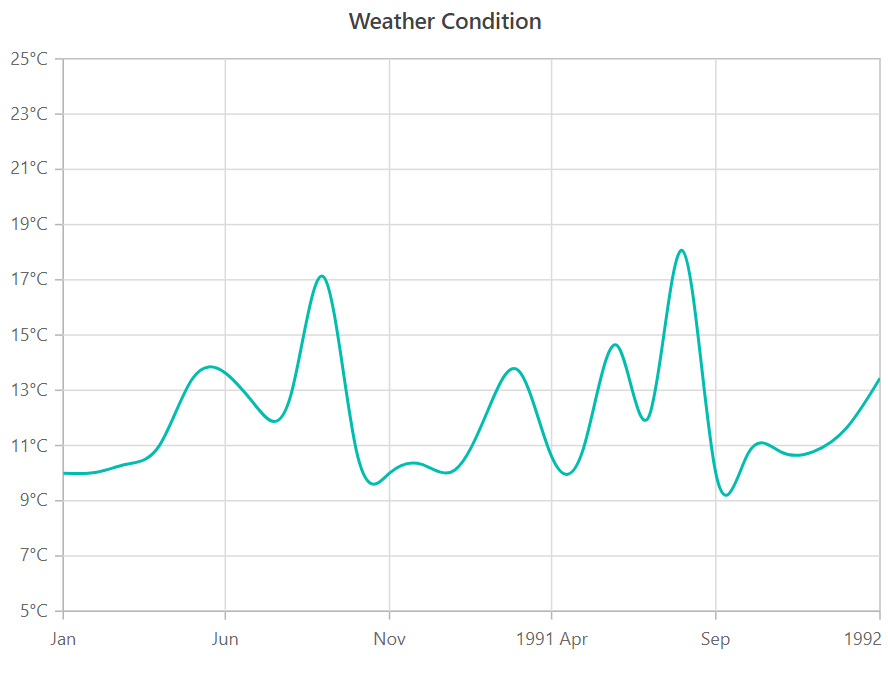
Data emitted by the promise is visualized in a Syncfusion chart in the following screenshot.
With this, a chart was rendered with some initial data. Let’s assume that the service is updating its data every 1000ms. Then we must get the data from the service every 1000ms and assign it to the chart.
 this.Obs = new Observable((observer) => {
              observer.next(this.dataService.getData(true));
              setInterval(() => {
                observer.next(this.dataService.getData(false));
               }, 1000)
           });
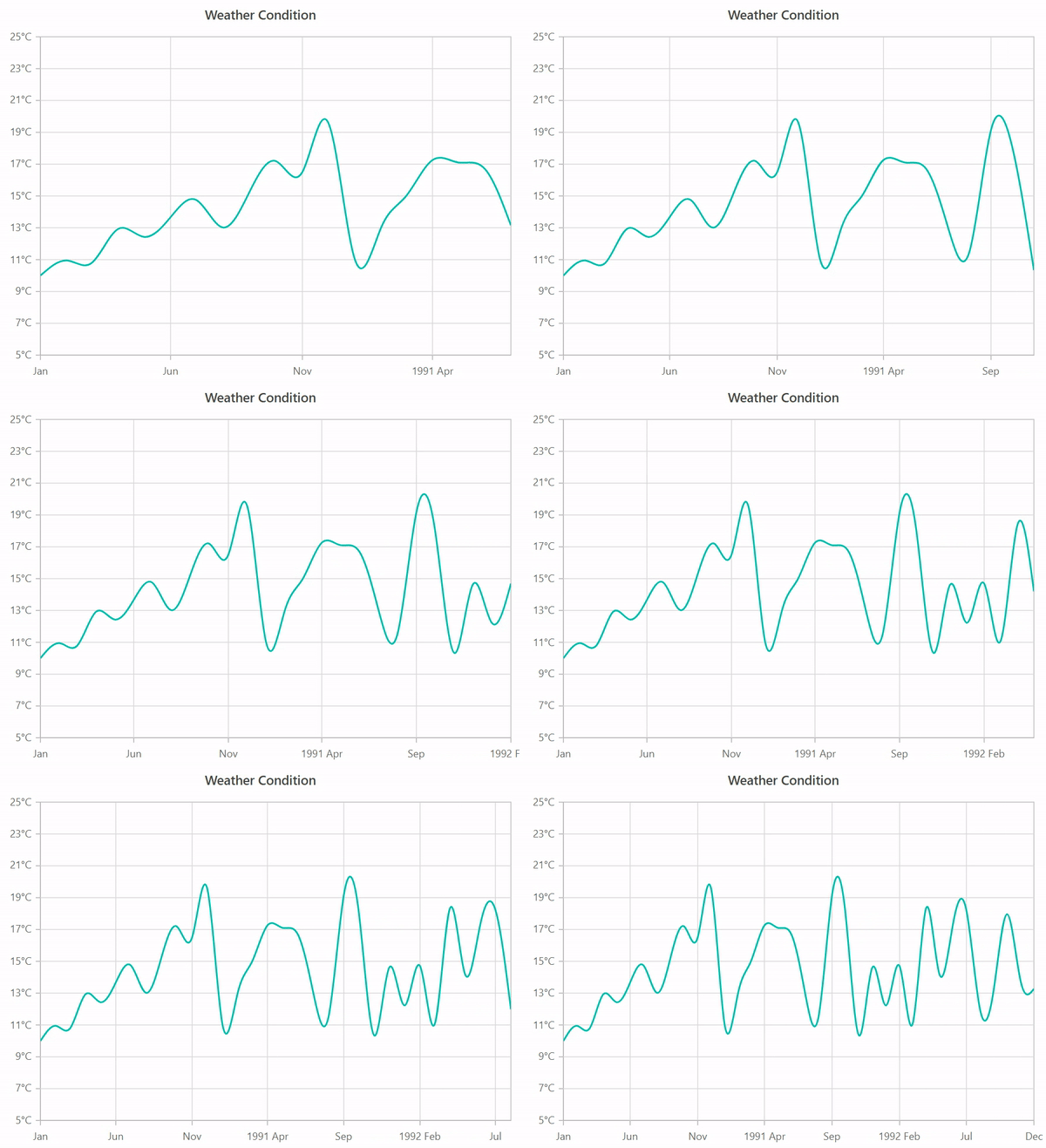
Now you can see the chart is being updated with the live data from the service.
Be amazed exploring what kind of application you can develop using Syncfusion Angular components.
Conclusion
In this blog, we learned about the difference between promise and observable (promise vs observable) in Angular with the help of the Syncfusion Charts component. Check out the example for promise vs observable here. To learn more about the Syncfusion Charts component for Angular, take a look at the documentation to explore all its features and API.
happy to assist you!
=====Int1===
using System;
using System.Collections.Generic;
using System.Linq;
public class C1
{
public int PageID { get; set; }
public string PageName { get; set; }
public List<C2> C2List { get; set; }
}
public class C2
{
public int ProdID { get; set; }
public string ProdName { get; set; }
}
public class C3
{
public int PageID { get; set; }
public string PageName { get; set; }
public int ProdID { get; set; }
public string ProdName { get; set; }
}
public class Program
{
public static void Main()
{
List<C1> c1List = new List<C1>
{
new C1
{
PageID = 1,
PageName = "Page 1",
C2List = new List<C2>
{
new C2 { ProdID = 101, ProdName = "Product 1" },
new C2 { ProdID = 102, ProdName = "Product 2" }
}
},
new C1
{
PageID = 2,
PageName = "Page 2",
C2List = new List<C2>
{
new C2 { ProdID = 201, ProdName = "Product 3" },
new C2 { ProdID = 202, ProdName = "Product 4" }
}
}
};
List<C3> c3List = c1List.SelectMany(c1 => c1.C2List, (c1, c2) => new C3
{
PageID = c1.PageID,
PageName = c1.PageName,
ProdID = c2.ProdID,
ProdName = c2.ProdName
}).ToList();
foreach (C3 c3 in c3List)
{
Console.WriteLine($"PageID: {c3.PageID}, PageName: {c3.PageName}, ProdID: {c3.ProdID}, ProdName: {c3.ProdName}");
}
}
}

No comments:
Post a Comment